How do I change my email address?

If you’ve moved to a new email address and want to keep receiving your Hebcal reminders, you don’t need to sign up from scratch. Hebcal lets you update the address on file for each subscription directly from a link in your existing emails.

The steps are slightly different depending on which type of subscription you have, so this article covers both:

  1. Weekly Shabbat candle-lighting time emails
  2. Yahrzeit, Hebrew Birthday & Anniversary reminder emails

Weekly Shabbat candle-lighting emails

If you receive a weekly email with Shabbat candle-lighting and Havdalah times for your city, here’s how to switch it to a new address:

  1. Open your favorite email program (Gmail, Microsoft Outlook, Apple Mail, or whichever app you use).
  2. Find a recent weekly email from Hebcal with your candle-lighting times (sent to your old email address).
  3. Scroll to the bottom of the message and look for the Update Settings link.
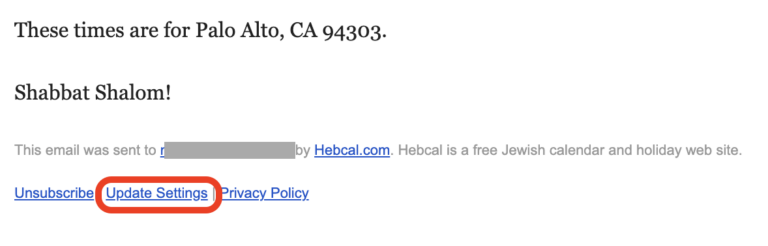
  4. Click that link. It will take you to hebcal.com.
  5. On the Hebcal site, enter your new email address and submit the form.
  6. Hebcal will send a confirmation message to your new email address.
  7. Open that confirmation message and click the activation link inside it.
  8. Once you click the link, your weekly candle-lighting subscription is officially updated to the new address, and the old address will stop receiving emails.

Yahrzeit, Hebrew Birthday & Anniversary emails

If you receive annual reminder emails for yahrzeits, Hebrew birthdays, or anniversaries, the process starts the same way but changes a bit:

  1. Open your email program and find a message from Hebcal about one of your yahrzeit, birthday, or anniversary reminders.
  2. Scroll to the bottom of the email and look for the Edit Yahrzeit, Edit Hebrew Birthday, or Edit Hebrew Anniversary link.
  3. Click that link to go to hebcal.com.
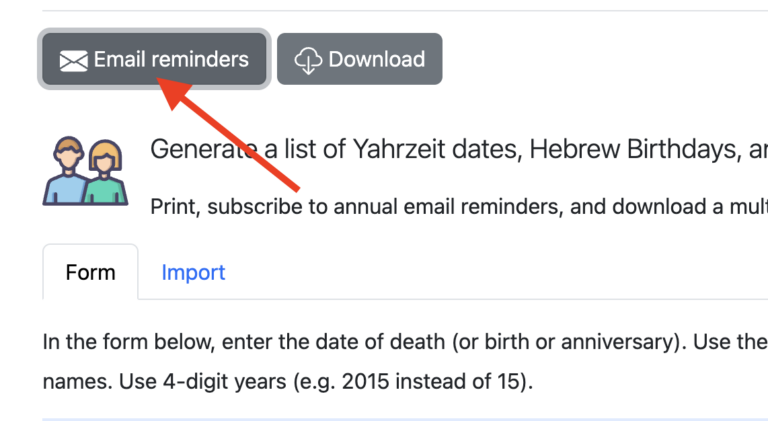
  4. Scroll up a bit and push the grey Email reminders button.
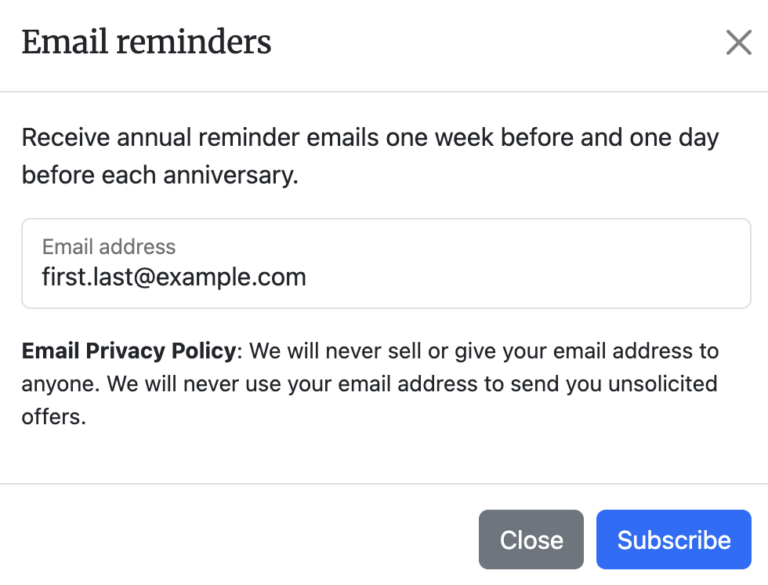
  5. Enter your new email address in the dialog box and push the blue Subscribe button to submit the form.
  6. Check your new email address for a confirmation message from Hebcal.
  7. Click the activation link inside that confirmation email.
  8. Your anniversary calendar reminders are now updated to send to the new address.
  9. To stop receiving reminder emails to your old address, back to your reminder email message and click the Unsubscribe button at the bottom of that message.
  10. You will see a web page that asks Do you wish to stop receiving annual email reminders of Person1’s Yahrzeit sent from Hebcal to recipient@example.com? push the blue Unsubscribe all (#) Yahrzeit Reminders button.

A few things to keep in mind

  • The confirmation step matters: your subscription won’t move to the new address until you click the activation link in the confirmation email.
  • If you have both a weekly Shabbat candle-lighting subscription and a yahrzeit/anniversary subscription, you’ll need to repeat this process separately for each one, since they’re managed independently.
  • If you no longer see the confirmation email, check your spam or junk folder before trying again.
Related articles

Colophon

Hebcal.com authored using hand-coded JavaScript/TypeScript in VSCode. Pre-2020, the website was built in PHP and Perl in Sublime Text 3 and Aquamacs.

Our minimalist, responsive front-end design is provided by the Bootstrap framework.

The website runs on Ubuntu Linux. We use the Vinyl Cache (née Varnish) HTTP accelerator. We primarily use DigitalOcean for hosting, with occasional use of Amazon Web Services (primarily SES for weekly emails and S3 for backups).

Our Help pages and news archives are powered by WordPress.

We use MySQL to store our email subscriber database, and SQLite for latitude/longitude location databases (GeoNames and USA ZIP codes).

Typefaces

Hebcal.com primarily uses Helvetica Neue for body and Merriweather for headers. Helvetica Neue is the default font for Bootstrap

Hebrew body and headline text is Adobe Hebrew.

The Hebcal logo uses SBL Hebrew and Merriweather.

A note about advertisements

Hebcal.com displays advertisements on some pages to help cover our operating costs. We don’t like inappropriate advertisements and it’s our policy to suppress them when we discover them.

If you see an inappropriate or offensive advertisement, please accept our sincere apologies for any offense caused.

Also, please let us know about the ad so we can suppress it. Please create a Hebcal Support ticket and describe the offending advertisement to the best of your ability (e.g. the name of the company or the URL).

Please attach a screenshot if you are willing and able to do so.

With a good description or a screenshot, we are typically able to find the offending advertisement, suppress it, and prevent any future advertisements from the same advertiser. Once we suppress an ad, it can take 24-48 hours before it completely disappears from our website.

Hebcal.com is a free service, and Income from displaying advertisements offsets the cost of hosting the website. Donations are always appreciated and never required, and they cover only a small part of the operating costs.

Numerical values of Hebrew letters

Our Hebrew Date Converter displays dates in Hebrew. Each letter of the Hebrew alef-bet (alphabet) has a numerical value, specified in the chart below.

When specifying years of the Hebrew calendar in the present millennium, we omit the thousands (which is presently 5, ה). For example, the Hebrew year 5782 is written as 782 (תשפ״ב) rather than 5782 (ה׳תשפ״ב).

ValueNameLetter
1alephא
2betב
3gimelג
4daletד
5hayה
6vavו
7zayinז
8khetח
9tetט
10yudי
20kafכ
30lamedל
40memמ
50nunנ
60samechס
70ayinע
80payפ
90tzadiצ
100kufק
200reishר
300shinש
400tavת

Note that the numbers 15 and 16 are treated specially, which if rendered as 10+5 or 10+6 would be a name of God, so they are normally written ט״ו (tet-vav, 9+6) and ט״ז (tet-zayin, 9+7).

For more information, see the Judaism 101 article on the Hebrew Alphabet, the Wikipedia article on Gematria, or JewishGen’s Reading Hebrew Tombstones page.