How do I change my email address?

If you’ve moved to a new email address and want to keep receiving your Hebcal reminders, you don’t need to sign up from scratch. Hebcal lets you update the address on file for each subscription directly from a link in your existing emails.

The steps are slightly different depending on which type of subscription you have, so this article covers both:

  1. Weekly Shabbat candle-lighting time emails
  2. Yahrzeit, Hebrew Birthday & Anniversary reminder emails

Weekly Shabbat candle-lighting emails

If you receive a weekly email with Shabbat candle-lighting and Havdalah times for your city, here’s how to switch it to a new address:

  1. Open your favorite email program (Gmail, Microsoft Outlook, Apple Mail, or whichever app you use).
  2. Find a recent weekly email from Hebcal with your candle-lighting times (sent to your old email address).
  3. Scroll to the bottom of the message and look for the Update Settings link.
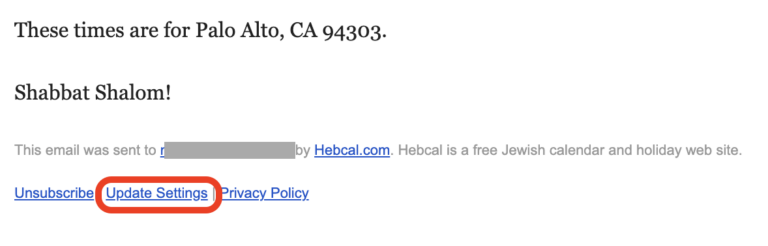
  4. Click that link. It will take you to hebcal.com.
  5. On the Hebcal site, enter your new email address and submit the form.
  6. Hebcal will send a confirmation message to your new email address.
  7. Open that confirmation message and click the activation link inside it.
  8. Once you click the link, your weekly candle-lighting subscription is officially updated to the new address, and the old address will stop receiving emails.

Yahrzeit, Hebrew Birthday & Anniversary emails

If you receive annual reminder emails for yahrzeits, Hebrew birthdays, or anniversaries, the process starts the same way but changes a bit:

  1. Open your email program and find a message from Hebcal about one of your yahrzeit, birthday, or anniversary reminders.
  2. Scroll to the bottom of the email and look for the Edit Yahrzeit, Edit Hebrew Birthday, or Edit Hebrew Anniversary link.
  3. Click that link to go to hebcal.com.
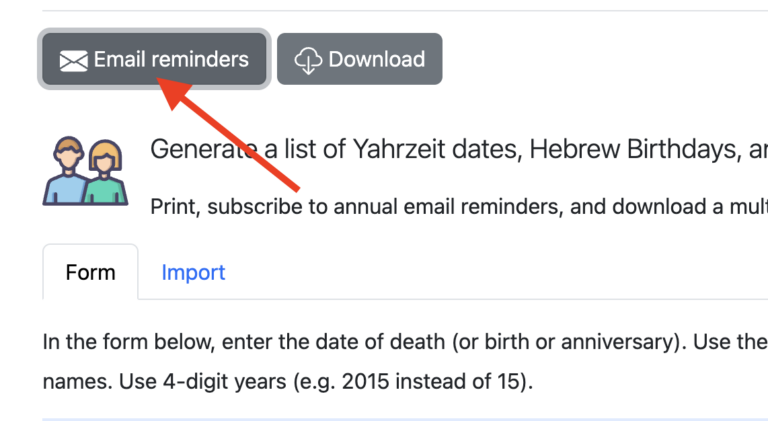
  4. Scroll up a bit and push the grey Email reminders button.
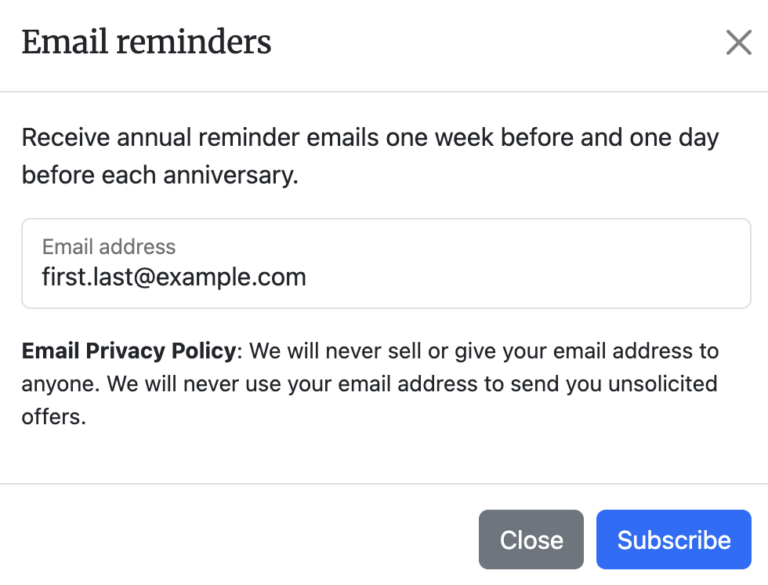
  5. Enter your new email address in the dialog box and push the blue Subscribe button to submit the form.
  6. Check your new email address for a confirmation message from Hebcal.
  7. Click the activation link inside that confirmation email.
  8. Your anniversary calendar reminders are now updated to send to the new address.
  9. To stop receiving reminder emails to your old address, back to your reminder email message and click the Unsubscribe button at the bottom of that message.
  10. You will see a web page that asks Do you wish to stop receiving annual email reminders of Person1’s Yahrzeit sent from Hebcal to recipient@example.com? push the blue Unsubscribe all (#) Yahrzeit Reminders button.

A few things to keep in mind

  • The confirmation step matters: your subscription won’t move to the new address until you click the activation link in the confirmation email.
  • If you have both a weekly Shabbat candle-lighting subscription and a yahrzeit/anniversary subscription, you’ll need to repeat this process separately for each one, since they’re managed independently.
  • If you no longer see the confirmation email, check your spam or junk folder before trying again.
Related articles

Updated Privacy Policy

We’ve updated our Privacy Policy for the first time since February 2022. The previous policy was generated using a GDPR-compliant template and, while legally sound, read like it was written for a large corporation, not a free community resource run by one person.

The new policy is rewritten in plain language and reflects how Hebcal actually works. A few highlights:

  • Data retention schedules are now specific. We describe exactly what we keep and for how long. We’ve also implemented an automated purge of old email tracking and bounce data for inactive subscriptions after 2 years.
  • Hebcal apps beyond the website. The policy now covers the Hebcal Apple Watch app (which collects no data at all) and the Alexa skill.
  • Analytics transparency. We describe our self-hosted, cookieless Matomo analytics setup, including how we anonymize IP addresses before they are stored.

You can read the full policy here. If you have questions, please contact us.

Hebrew and Gregorian date conversion accuracy

Converting between Hebrew and Gregorian dates for very early years is mathematically possible (and is supported by our Hebrew Date Converter), but the results should be treated as approximations rather than historically precise dates.

The Hebrew calendar evolved into a fixed, calculation-based system beginning in the 4th century CE. This shift replaced earlier dependence on eyewitness moon sightings and centralized rulings on leap years with a predictable mathematical framework. The detailed rules were recorded in writing over the following centuries and were later systematized by Maimonides in the 12th century, by which point the calendar had become uniform across Jewish communities by the medieval era. [1]

Before the calendar rules were fully standardized in the early medieval period, both the Hebrew and civil calendars were influenced by local practice, observational methods, and later retroactive calculations. As a result, modern algorithms can project dates backward consistently, but they may not reflect how dates were actually observed or recorded at the time.

Any results for year 1752 CE and earlier published on Hebcal.com will be inaccurate. Hebcal does not take into account a correction of ten days that was introduced by Pope Gregory XIII known as the Gregorian Reformation.

Encyclopædia Britannica has an excellent introduction to the Jewish calendar. Another well written treatment of the Jewish calendar can be found in Understanding the Jewish Calendar by Rabbi Nathan Bushwick.

Hebcal 2025 Year in Review

We’ve been hard at work this past year making Hebcal easier to use and a more complete resource. Here is a summary of the changes we’ve made (major and minor) during the past Gregorian year.

Fully Hebrew calendars

Major contribution by Doron Behar

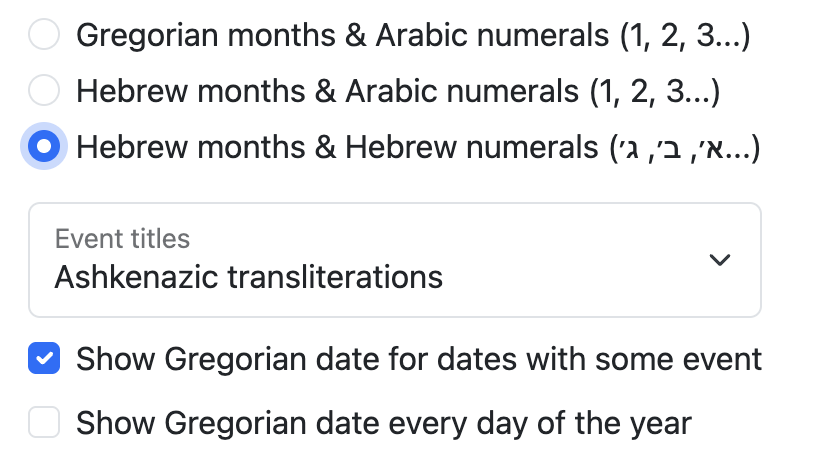
In December 2025, Hebcal added support for fully Hebrew calendars, introducing a fundamentally different calendar model from the traditional Gregorian-first layout. Instead of presenting Gregorian months with Hebrew dates as annotations, this new mode uses Hebrew months as the primary structure, with Gregorian dates shown as secondary, auxiliary information.

This inversion more closely reflects how the Hebrew calendar is traditionally experienced, making Hebrew months, holidays, and week structures first-class elements rather than overlays. Printable full-year PDF output is also supported.

You’ll find the new options on our custom Jewish calendar page:

Holidays

We corrected Sigd date handling when 29 Cheshvan falls on Shabbat. Sigd is normally observed on 29 Cheshvan, but when that date coincides with Shabbat (as in Hebrew year 5785), the holiday is observed earlier, on Thursday, in accordance with Israeli law. This matches actual practice, as reported in contemporary coverage such as the Jerusalem Post.

Torah Readings

We added the Megillah reading for the morning of Tisha B’Av, corrected Ashkenazic transliteration for Shabbat Chol ha-Moed Sukkot, fixed the Hebrew spelling of Korach with niqqud (קֹרַח) and without (קורח). Aliyah divisions for Parashat Terumah now align with Koren, Etz Hayyim, and the USCJ Luach.

The Parsha Year page is now easier to read on both mobile devices and large screens.

Daily Learning calendars

We added four new study cycles added to the existing suite of perpetual learning calendars:

Perek Yomi introduces an alternate option for Mishnah study: one full chapter per day. This complements the already-available Mishna Yomi calendar (two mishnayot per day) by offering a faster, chapter-based rhythm that completes the Mishnah on a shorter cycle. The Mishnah, redacted around 200 CE, is the foundational text of the Oral Torah and the basis for later Talmudic discussion.

Daily Rambam (Maimonides’ Mishneh Torah) now includes support for the traditional three-chapters-per-day track, in addition to the existing one-chapter-per-day option.

Sefer HaMitzvos Yomi adds a daily study calendar for Rambam’s enumeration of the 613 commandments. This cycle focuses on one or more mitzvot each day, offering a thematic alternative to chapter-based halachic study. The cycle takes just under one year to complete.

Kitzur Shulchan Aruch Yomi provides a daily learning cycle for Rabbi Shlomo Ganzfried’s concise halachic compendium, covering practical Jewish law for everyday life. The yomi schedule allows learners to complete the work over the course of one Hebrew year.

Developer web APIs

We have added experimental support for the new Model Context Protocol (MCP) standard to enable AI models such as Claude, ChatGPT and Gemini to access and interact with more precise Hebrew calendar and Jewish holidays instead of relying on built-in “knowledge”. Supported Hebcal MCP methods include bidirectional conversion between Gregorian and Hebrew dates, Yahrzeit calculation, weekly Torah portion lookup, Jewish holiday listings for an entire civil year, and daily learning schedules such as Daf Yomi. Hebcal’s remote MCP server URL is available at https://www.hebcal.com/mcp

Assur Melacha (work forbidden) API: Hebcal.com now offers an experimental REST API for determining for a given location if the date and time has a melacha (work) prohibition. This API can be used by home automation systems or other applications that wish to change functionality when Shabbat or yontiff begins or ends.

The Yahrzeit + Anniversary REST API now supports Hebrew dates as an alternative to Gregorian dates, e.g. &hyX=5769&hmX=Cheshvan&hdX=15. Hebrew month names may be specified in Hebrew (UTF-8) or transliterated using the same technique as on the Hebrew Date Converter REST API.

Localization

We added Portuguese translations, courtesy Zushe Ledovitch.

The Jewish calendar REST API now supports Hebrew memo. These translations were AI-assisted and may need some edits.

Miscellaneous / UI and usability

Molad announcements were shortened and clarified (from “Molad Sivan: Fri, 35 minutes and 10 chalakim after 3:00pm” to “Molad Sivan: Friday, 3:35pm and 10 chalakim“). Shabbat Mevarchim pages now display Molad times.

We added CSV download support for Shabbat Candle-lighting times (year-at-a-glance / “Refrigerator times”).

When selecting a city for candle-lighting and fast times, our typeahead search now includes a clear (×) button.

iCalendar feeds now include the newer REFRESH-INTERVAL and improve compatibility by fixing default to be P7D.

To reduce server load of spiders/robots indexing extreme past (Gregorian year 100 or earlier) and far-future years (Gregorian year 3000 or later), the website no longer publishes detailed holiday or Torah reading pages. Converting between Hebrew and Gregorian dates for very early years is mathematically possible (and still supported by our Hebrew Date Converter), but the results should be treated as approximations rather than historically precise dates. See Hebrew and Gregorian date conversion accuracy for more details.

Following modern HTTP semantics, we transitioned broadly to ETag-based caching, removing Last-Modified headers. This improves CDN behavior and client cache correctness.

Colophon

Hebcal.com authored using hand-coded JavaScript/TypeScript in VSCode. Pre-2020, the website was built in PHP and Perl in Sublime Text 3 and Aquamacs.

Our minimalist, responsive front-end design is provided by the Bootstrap framework.

The website runs on Ubuntu Linux. We use the Vinyl Cache (née Varnish) HTTP accelerator. We primarily use DigitalOcean for hosting, with occasional use of Amazon Web Services (primarily SES for weekly emails and S3 for backups).

Our Help pages and news archives are powered by WordPress.

We use MySQL to store our email subscriber database, and SQLite for latitude/longitude location databases (GeoNames and USA ZIP codes).

Typefaces

Hebcal.com primarily uses Helvetica Neue for body and Merriweather for headers. Helvetica Neue is the default font for Bootstrap

Hebrew body and headline text is Adobe Hebrew.

The Hebcal logo uses SBL Hebrew and Merriweather.